
Record on your iPhone, transcribe on your Mac
Not every conversation happens at your desk. Tiro for iPhone records the rest and sends it to your Mac, which does the transcription.
On your iPhone
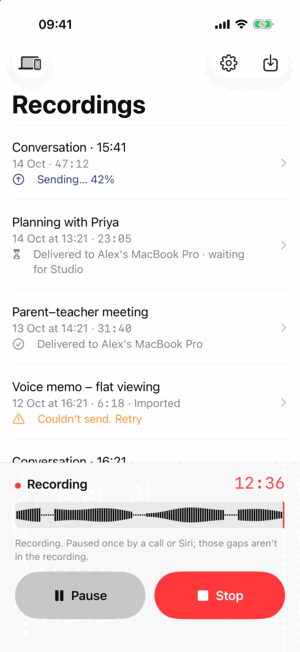
- Record with one tap. The recording keeps going when the screen locks or you switch apps.
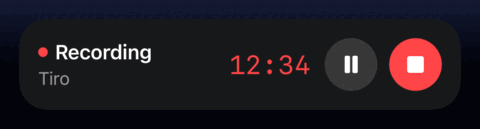
- Pause or stop from the Lock Screen and the Dynamic Island, without opening the app.
- Play recordings back, skip 15 seconds, and change the speed.
- Import audio files from other apps.
- Your recordings stay on your iPhone, whether or not you send them.
On your Mac
Pair once: on the Mac, open Tiro › Settings › Devices and choose Pair iPhone, scan the code with your iPhone, and check that both show the same six digits. Then tap Send to Mac on a recording. Your Mac transcribes it, tells the speakers apart, and writes notes when you want them.
How the recording travels
Each recording is end-to-end encrypted on your iPhone with a key only your Mac has. Tiro’s relay passes it on without being able to read it, and deletes it as soon as your Mac has it, or after 7 days if your Mac never collects it. There’s no account: pairing is device to device.
What you need
iOS 18 or later on the iPhone, and Tiro for Mac on a Mac with Apple silicon (M1 or later) and macOS 15 Sequoia or later. The iPhone doesn’t transcribe. Both apps are one free download.