Your meetings, remembered. Kept on your Mac.

Tiro records any call or conversation, transcribes it on your Mac, knows who said what, and answers your questions about it. The recording stays with you.

Free. One download for Mac and iPhone. No account.

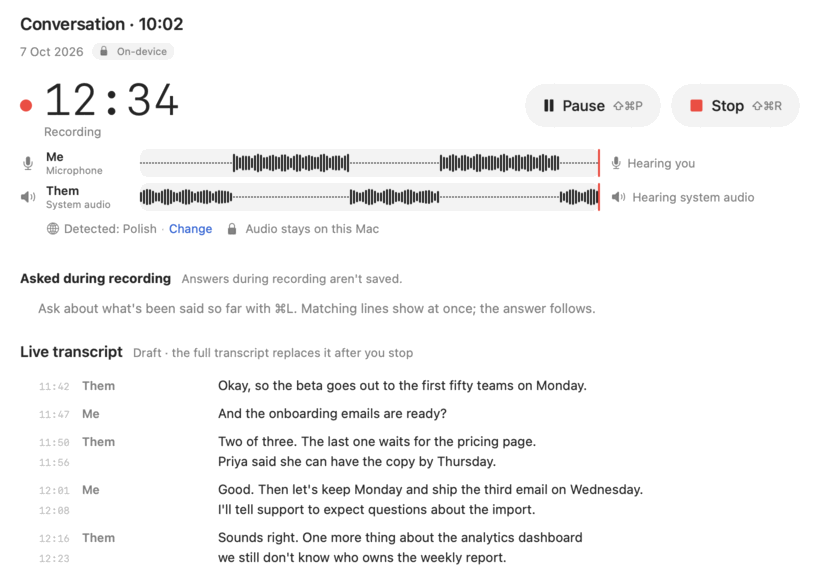
Tiro recording a call: a large timer at 12:34, a level lane for your microphone and one for system audio, the line Audio stays on this Mac, and a live transcript below with lines from Me and Them.

The basics

No bot in the call
Tiro records your microphone and your Mac’s system audio, so it works with Zoom, Meet, Teams or any other app, and with people in the room. Nobody joins your meeting.
Transcribed on your Mac
Speech models run on your Mac’s Apple silicon: Whisper for about a hundred languages, Parakeet for fast transcripts in 25 European ones.
Polish, English, or both
A meeting that switches languages is transcribed sentence by sentence, and the transcript marks where the language changes.

Tiro at a glance

A record of what was said, and what it means

Follow along live. Ask as you go.

While you record, a live transcript shows what’s been said. Missed something? Press ⌘L and ask: matching lines appear at once, and the answer follows.

Afterwards, ask one recording, everything with one person, or all your conversations. Every answer points to the moments it came from.
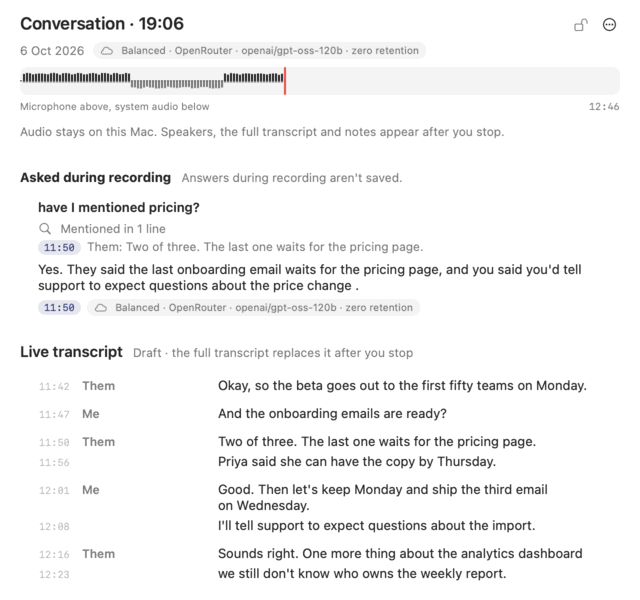
During a recording, the question “have I mentioned pricing?” is answered from the live transcript, with the matching line at 11:50 linked as evidence.

Notes with decisions and action items

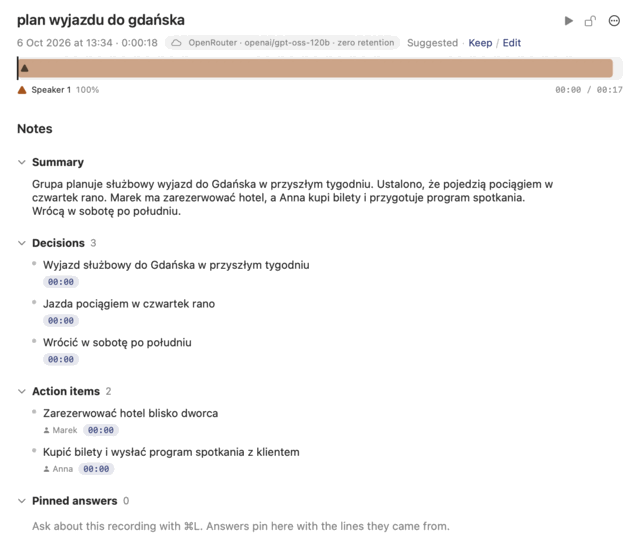
When you want notes, Tiro writes a summary, the decisions, and the action items with their owners. Each item links to the moment it was said, so checking it takes one click.

Notes are written by a language model on your Mac, or by a cloud model if you choose one. Either way, the label says which.

Notes for a short Polish conversation about a business trip to Gdańsk: a summary, three decisions and two action items owned by Marek and Anna, each with a timestamp chip.

Knows who’s speaking

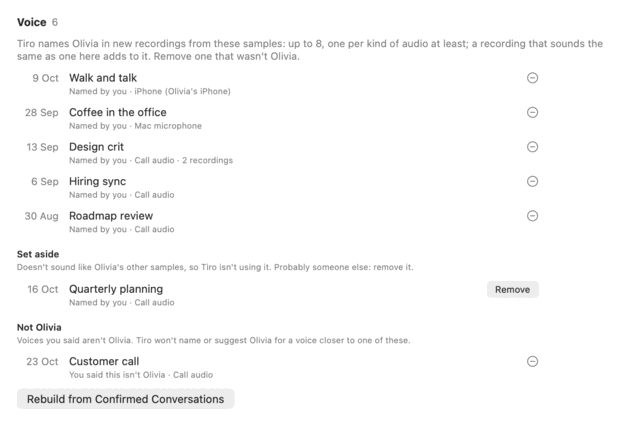
Tiro tells the voices in a recording apart. Name one once and it recognises that person in your next recordings, from the Mac’s microphone, a call, or your iPhone.

Tiro remembers the voices you name, on this Mac. Forget anyone’s voice whenever you like.

The voice samples Tiro keeps for a person named Olivia: five recordings named by you, one set aside because it doesn’t sound like her, and one you said wasn’t her.

Named from your calendar, or from where you were

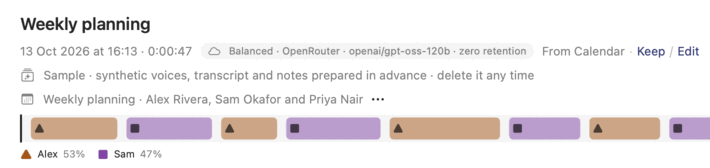
Turn on calendar naming and a recording takes the title of the meeting in your calendar at that time, unless you typed one. Its attendees appear in each speaker’s menu, so naming a voice is one click. Tiro reads the calendar on your Mac and keeps only the meeting’s title and the attendees’ names.

Or name recordings by where they were made, like a café or a street. Apple’s map service turns the location into a name, so the coordinates go only to Apple. Both are off until you turn them on, and private recordings get neither.

A sample recording titled Weekly planning, marked From Calendar, with the calendar event’s attendees Alex Rivera, Sam Okafor and Priya Nair under its date.

Record on your iPhone. Transcribe on your Mac.

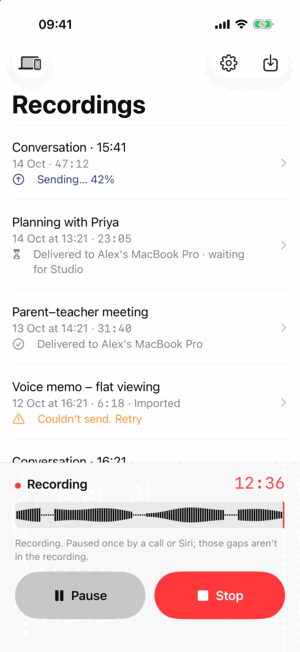
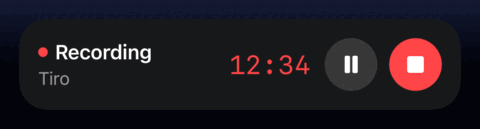
Tiro for iPhone is a recorder for the conversations away from your desk. Pause or stop from the Lock Screen without opening the app.

Each recording travels to your Mac end-to-end encrypted, and your Mac transcribes it like any other.

Tiro for iPhone recording at 12:37, above a list of recordings: one sending at 42 percent, two delivered to a MacBook.
The Lock Screen shows Tiro recording at 12:34 with Pause and Stop buttons.

Dictate into any app

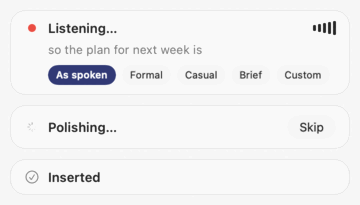
Hold a shortcut, speak, and let go: the text goes where you were typing, in any app. Your words appear on the panel as you speak, and before they go in, Tiro fixes typos and misheard words, in the style you pick.

Speech is recognised on your Mac, and the audio stays in memory, never in a file. Polishing runs where your AI preset runs: on your Mac unless you chose a cloud model. Dictation is off until you turn it on. More about dictation

Tiro’s dictation panel in three moments: Listening, with the words so far, so the plan for next week is, and style chips As spoken, Formal, Casual, Brief and Custom; then Polishing, with a Skip button; then Inserted.

Your AI agents can read along, if you let them

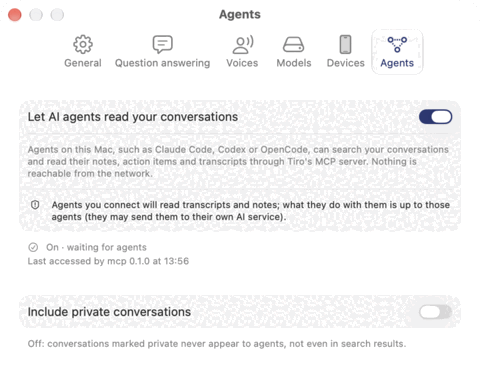
Turn on Agents, and tools like Claude Code, Codex or Claude Desktop can search your conversations and read notes, action items and transcripts through Tiro’s local MCP server.

It’s off until you turn it on. The server answers only on this Mac (localhost), so nothing goes over the internet between your agent and Tiro, and conversations you mark private stay hidden from agents.

What an agent does with what it reads is up to the agent: one that runs in the cloud sends it to its own provider.

Tiro’s Agents settings: Let AI agents read your conversations is on, and Include private conversations is off.

Fix what it misheard

Edit a line, remove what shouldn’t be there, or move a line to the right speaker. Edits are marked, everything can be undone, and regenerated notes never overwrite yours.

00:32Olivia

Could we lock in the rate from September?

00:40You

Yes, let’s fix it to that rate. edited

00:421 line removed

Thank you. Restore

New in Tiro

Dictation that keeps up with your connection and your headphones, and recordings that take less room.

Polished where it’s quick
When dictation’s polishing uses a cloud model, it does so only while your connection is fast enough to keep up. On a slow connection, offline or in Low Data Mode, your words are polished on your Mac, or go in as heard if the on-device model isn’t ready. The panel shows where, from the moment you press the shortcut.
AirPods keep their sound
Dictating with AirPods or another Bluetooth headset on? Tiro listens through your Mac’s own microphone instead, so your music and calls keep full quality. Pick a different microphone in Settings › Dictation.
A soft chime when it’s ready
When polishing takes a moment, a soft sound tells you the text is in, so you can look away while it works. Text that goes in at once makes no sound. Turn it off in Settings › Dictation.
Recordings take less than half the space
Recordings are kept as mono speech audio, about 29 MB an hour, and older ones are converted while Tiro is idle. If space is tight, Settings › Storage can archive old recordings’ audio at lower quality or remove it. Both are off until you choose them, and transcripts and notes are always kept.

Where your data goes

The short answer is your Mac. Here is everything that can leave it, and when.

Where your data goes Audio, transcripts, notes and the voices you name stay on your Mac. Recordings from your iPhone reach the Mac end-to-end encrypted through Tiro’s relay, which can’t read them and deletes them once delivered. Two things can leave the Mac, only if you turn them on: transcript or dictated text for an optional cloud AI, and anonymous usage counts to Tiro’s own server. Your iPhone records end-to-end encrypted Tiro relay can’t read it, deletes it once delivered Your Mac Transcription, speakers, notes and answers run here by default. Audio Transcripts and notes Voices you named Settings and your API key Stays on this Mac if you choose Cloud AI off by default text only, never audio zero data retention never private recordings if you agree Usage counts opt-in, anonymous to Tiro’s own server never content or names Where your data goes Audio, transcripts, notes and the voices you name stay on your Mac. Recordings from your iPhone reach the Mac end-to-end encrypted through Tiro’s relay, which can’t read them and deletes them once delivered. Two things can leave the Mac, only if you turn them on: transcript or dictated text for an optional cloud AI, and anonymous usage counts to Tiro’s own server. Your iPhone records Tiro relay can’t read it, deletes it once delivered end-to-end encrypted Your Mac Transcription, speakers, notes and answers run here by default. Audio Transcripts and notes Voices you named Settings and your API key Stays on this Mac if you choose if you agree Cloud AI off by default text only, never audio zero data retention never private recordings Usage counts opt-in, anonymous to Tiro’s own server never content or names
On your Mac
Audio, transcripts, notes and the voices you name are stored on your Mac. Transcription, speaker recognition, notes and answers all run there unless you choose otherwise. We never receive them.
iPhone to Mac
End-to-end encrypted on your iPhone with a key only your Mac has. Tiro’s relay passes on bytes it can’t read, and deletes them as soon as your Mac has the recording, or after 7 days if it never collects it.
Cloud AI, if you choose it
Off by default. With your own OpenRouter key, notes and answers send transcript text, and dictation’s polishing sends what you dictated: never audio, only to providers that keep no data, and never for recordings you mark private.
Usage counts, if you agree
Tiro asks once. If you say yes, it sends anonymous counts, like “a recording was started from the menu bar”, to Tiro’s own server. Never what was said, titles or names. Change your mind any time in Settings.
Model downloads
The first time Tiro needs a speech or language model, it downloads it from Hugging Face. Nothing of yours is sent.

No account. No ads. No tracking.

Read the privacy policy

More about Tiro

Compare

Questions about Tiro

Which Macs does Tiro run on?

Macs with Apple silicon (M1 or later) running macOS 15 Sequoia or later. Intel Macs aren’t supported. Tiro for iPhone needs iOS 18 or later.

How much disk space and memory does it need?

The speech and speaker models take about 1.6 GB and download the first time Tiro needs them. Writing notes and answers on your Mac adds a local language model of about 3.5 to 4.5 GB; Tiro picks the smaller one for Macs with 16 GB of memory or less. That model is optional: you can use a cloud model instead, or neither. Recordings take about 29 MB an hour; Settings › Storage can archive or remove old recordings’ audio, and always keeps their transcripts and notes.

Which languages does it understand?

Whisper transcribes about a hundred languages, and Parakeet transcribes 25 European languages, Polish and English among them, faster. Conversations that mix languages, like Polish and English, are transcribed sentence by sentence. Tiro itself is in English for now.

How is Tiro different from Otter, Granola or Fireflies?

Tiro is built around your Mac rather than a cloud service. Many meeting assistants send a bot into the call or upload the audio to their servers; Tiro records your microphone and system audio directly and transcribes on your Mac, with no account, and we never see your audio or transcripts. It handles Polish and English, even mixed in one meeting, and AI agents on your Mac can read your conversations through a local MCP server if you allow it. The trade-offs: it needs a Mac with Apple silicon, and there is no web app or shared team workspace.

What does the iPhone app do?

It records, and it sends each recording to your paired Mac, end-to-end encrypted. You can pause and stop from the Lock Screen. Transcripts, speakers, notes and questions happen on the Mac; the original recording also stays on your iPhone.

Can Tiro dictate into other apps?

Yes, on the Mac, once you turn it on in Settings › Dictation. Hold the shortcut, speak, and let go: Parakeet recognises the speech on your Mac, and the text goes where you were typing. The audio stays in memory and is never written to a file. Before the text goes in, Tiro can fix typos and misheard words with the language model your AI preset uses, on your Mac by default. A cloud model, if you chose one, is used only while your connection is fast enough; the panel shows where your words are polished.

How much does it cost?

Tiro is free, with no subscription and no in-app purchases. One download covers your Mac and your iPhone.

Do I need an account?

No. There’s nothing to sign up for. To pair your iPhone with your Mac, you scan a QR code and check that both show the same six digits.

How do I delete my data?

Delete a recording in Tiro and it goes to the Trash. Forget a remembered voice in Settings › Voices. To remove everything, quit Tiro and delete its folder, ~/Library/Containers/dev.trof.tiro. Your Mac’s own backups, such as Time Machine, may keep copies. On the iPhone, deleting the app deletes its recordings.